Agency Website Best Practices: 8 Pages That Sell And Market Your Agency 24/7
When was the last time you updated your About page? Your Process page? Your case studies? Your FAQ? Your blog?
If you had to pause and think, you're not alone. Here's what I see happening across hundreds of agency sites every year.
Agency owners spend months and thousands of dollars on a redesign for their agency site. New fonts. New hero graphics or video. A slick scroll animation. Fresh color palette. Maybe even custom illustrations.
Yet the About page is three sentences long. There's no Process page at all. The Service pages read like a bulleted list of deliverables. The last blog post is from 2023. And the FAQ? Doesn't exist.
Does this sound familiar?
Here's the bigger picture. New business is the #1 challenge agency owners list for the year ahead. That's from the 2025 State of Digital Agencies survey by Rand Fishkin and Paddy Moogan. Only 14% of agencies describe their sales pipeline as healthy. 32% call it not very good.
So agencies hunt for the silver bullet. Cold email. LinkedIn outreach. Paid ads. Networking events. Industry conferences. 59% have tried outbound sales, but only 9% call it very effective.
Meanwhile, the most underused lead generation asset is sitting in plain sight. Your own agency website. The same kind of asset you charge clients $5,000 to $50,000 to build. The one you tell prospects will transform their business. It's probably not doing that work for you.
Here's the uncomfortable truth. A website that looks great but doesn't do the work of marketing and selling is an expensive business card. And you're probably building that same kind of site for your clients, which means they have the exact same problem.
The good news is that agency website best practices aren't complicated. They usually come down to eight pages: specific jobs, a technical foundation that supports them, and a measurement layer that tells you what's working. Get those right and your site sells and markets for you 24/7.
Table of Contents
- What Are Agency Website Best Practices?
- Your Website Does Two Jobs (Marketing And Sales)
- The Foundation: Speed, Mobile, And Core Web Vitals
- Page 1: The Home Page (The 5-Second Test)
- Page 2: The About Page (Trust, Not Ego)
- Page 3: The Process Page (What It's Like To Work With You)
- Page 4: Service Pages (Outcomes, Not Deliverables)
- Page 5: Case Studies And Results (Proof They're Not The First)
- Page 6: The Blog (Thought Leadership And The Marketing Engine)
- Page 7: FAQs (Context-Specific First, Centralized If Needed)
- Page 8: The Contact Page (Where Most Agencies Drop The Ball At The Goal Line)
- The Measurement Layer (What Most Agencies Skip)
- A Real Example: Practicing What We Preach
- The 10-Point Agency Website Check
- Frequently Asked Questions
- Apply Agency Website Best Practices In Your Sales Process
- Your Next Move
What Are Agency Website Best Practices?
Agency website best practices turn an agency's site into a working sales and marketing asset. They cover design, content, and key measurement standards. They include eight essential pages: home, about, process, services, case studies, blog, FAQ, and contact. The technical foundation must load fast on mobile. The measurement layer tracks conversion events. The goal: a site that attracts qualified leads, handles objections, and converts visitors 24/7. No outbound or paid ads required.
Your Website Does Two Jobs (Marketing And Sales)
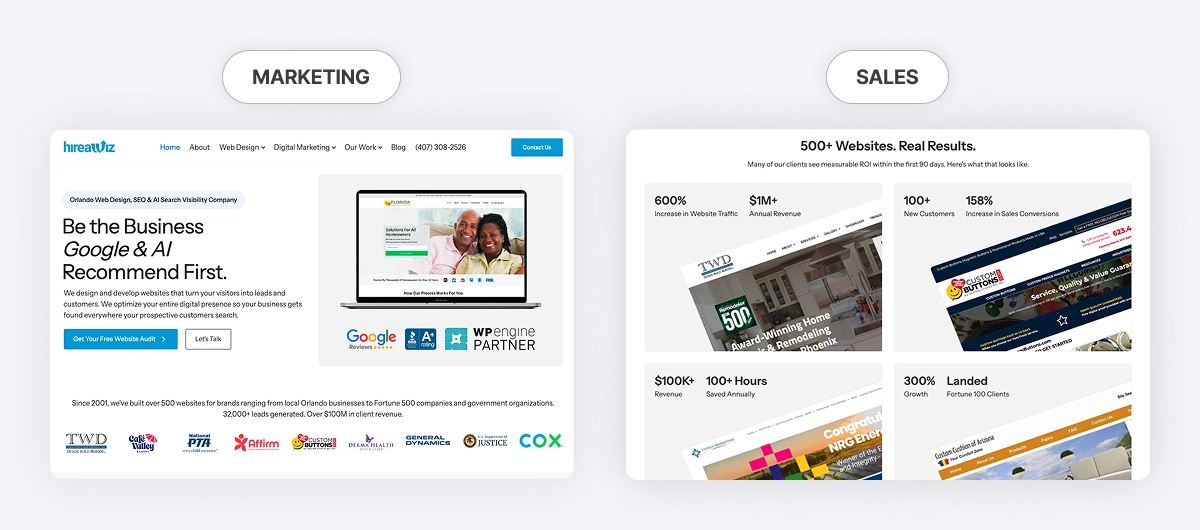
An effective agency website does both jobs well. It markets, and it sells.
Marketing is the top of the funnel. Attracting the right prospects. Building authority. Getting found in Google and AI search. Educating people who aren't ready to buy yet.
Sales is the bottom of the funnel. Handling objections. Building trust with prospects who are already evaluating you. Converting visitors into booked calls.
Most agencies build pages that do neither job well. The site looks pretty, and nothing happens. The agency website best practices below are the eight pages that actually do both jobs, the technical foundation underneath them, and the gaps I see most often.
Strong Vs. Weak Agency Website At A Glance
| Page | Strong Version | Weak Version |
|---|---|---|
| Home | Passes 5-second test, 2-3 services featured, one clear CTA, social proof above the fold | Generic headline ("we build beautiful websites"), every service listed, multiple competing CTAs |
| About | Team photos, founder video, point of view, niche credentials | LinkedIn-style bio, stock images, corporate founding history |
| Process | Named methodology, timelines per stage, and client responsibilities spelled out | Three buried sentences or no Process page at all |
| Services | Outcomes-led copy, pricing transparency, primary CTA + lead widget | Feature lists, hidden pricing, "book a call" only |
| Case Studies | Specific before/after numbers, named clients, video testimonials, linked to services | Vague outcomes, no metrics, "we did it all" stories |
| Blog | Pillar clusters, author bylines, monthly cadence, lead magnets | Sporadic company news, anonymous posts, no CTAs |
| FAQ | Embedded on relevant pages plus a categorized centralized page, 50-150 word answers, schema markup, internal links | One long list, vague answers, no schema, or no FAQ content anywhere |
| Contact | Visible phone/email/address, embedded Google Business Profile, social proof on the page, 3-5 field form, real thank-you page with next steps | Generic form only, no contact info, no GBP embed, no social proof, dead-end "thanks" page |
The Foundation: Speed, Mobile, And Core Web Vitals
Before we talk about a single page, your site has to actually load. Fast. On mobile.
Here's what most agencies miss when they talk about content strategy. Speed and mobile performance are foundational. If your site takes 5 seconds to load on a phone, none of the pages we're about to discuss matter, because half your prospects have already left.
The numbers are hard to argue with:
- 53% of mobile site visits are abandoned if pages take longer than 3 seconds to load (Google, "The Need for Mobile Speed")
- Sites that meet all three Core Web Vitals thresholds see users 24% less likely to abandon page loads (Google News Initiative)
- A 0.1-second improvement in mobile page speed can increase retail conversion rates by 8.4% (Google / Deloitte, "Milliseconds Make Millions")
Add to that: AI crawlers operate on limited crawl budgets per domain. Fast-loading pages get indexed more completely, which means more of your content is available for AI citations. A slow site is an invisible site in both Google and AI search.
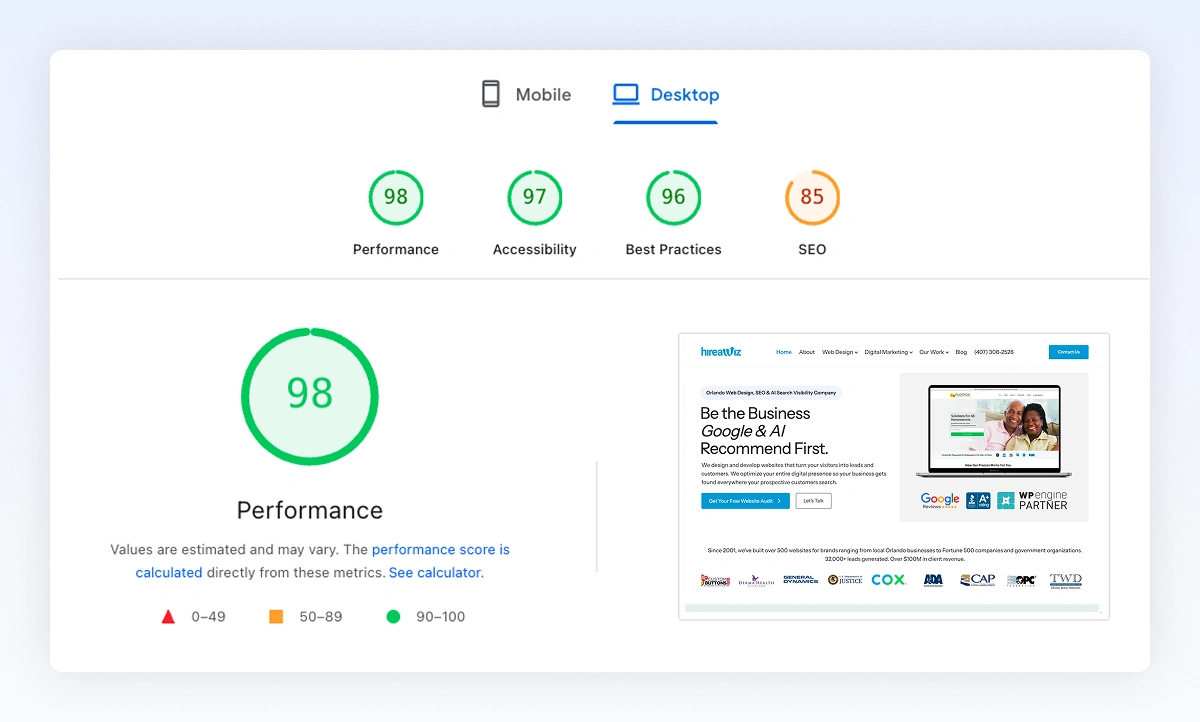
Run your homepage and top three service pages through Google's free PageSpeed Insights tool. If your mobile Largest Contentful Paint (LCP) is over 2.5 seconds, or your Cumulative Layout Shift (CLS) is over 0.1, that's your starting point. Fix this before you touch the content.
For a deeper diagnostic you can share with clients, My Web Audit offers a page speed audit template. It turns raw PageSpeed data into a client-ready report with prioritized recommendations. We've also written more on how agencies can use Core Web Vitals to win deals.
The fix: Test your top pages on mobile. Fix the technical foundation first. Content strategy on a slow site is rearranging deck chairs.
Page 1: The Home Page (The 5-Second Test)
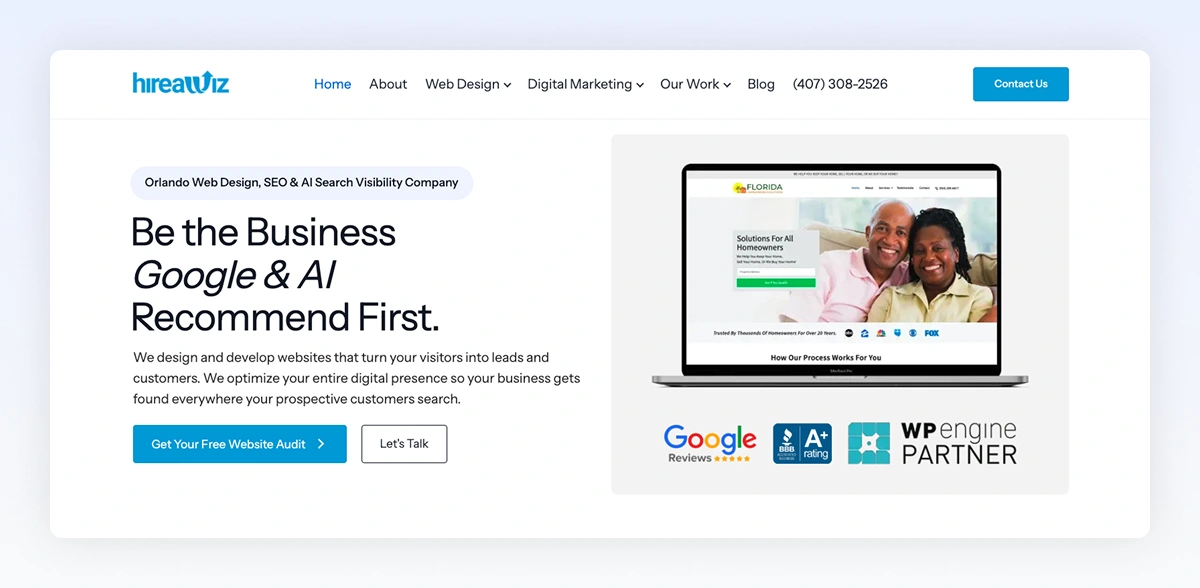
Above the fold, a visitor should be able to answer three questions in 5 seconds:
- Who is this for?
- What do they do?
- What happens next?
Most agency homepages fail on question one. They say something like "We build beautiful websites." Okay, for whom? Compare that to "We build lead-generating websites for home service contractors who are tired of paying for leads."
Same business. Completely different clarity.
Here's the other trap. Agencies try to stuff every service they offer onto the homepage. SEO, web design, PPC, social, content, email, GBP, CRO, branding, and five more. By the time a visitor scrolls through all of it, they have no idea what you're actually great at.
Pick the top two or three services that drive most of your revenue and lead with those. Everything else lives on the main services page or in the navigation. A focused homepage converts better than a kitchen-sink homepage every time.
And put your social proof above or just below the fold. Client logos, a testimonial, a recognizable award, or a partnership. Prospects are deciding in seconds whether to keep scrolling. Proof accelerates that decision.
One more thing. Test your hero on a phone. Most agency traffic is mobile. If your hero headline gets cut off or your CTA button is below the fold on mobile, you're losing visitors before they read a word.
The fix: Rewrite your hero headline so a prospect in your niche reads it and thinks, "this is for me." Feature your top two or three revenue-driving services with clear outcomes. Add one primary call to action. Put trust signals in the first scroll. Test it on mobile.
Page 2: The About Page (Trust, Not Ego)
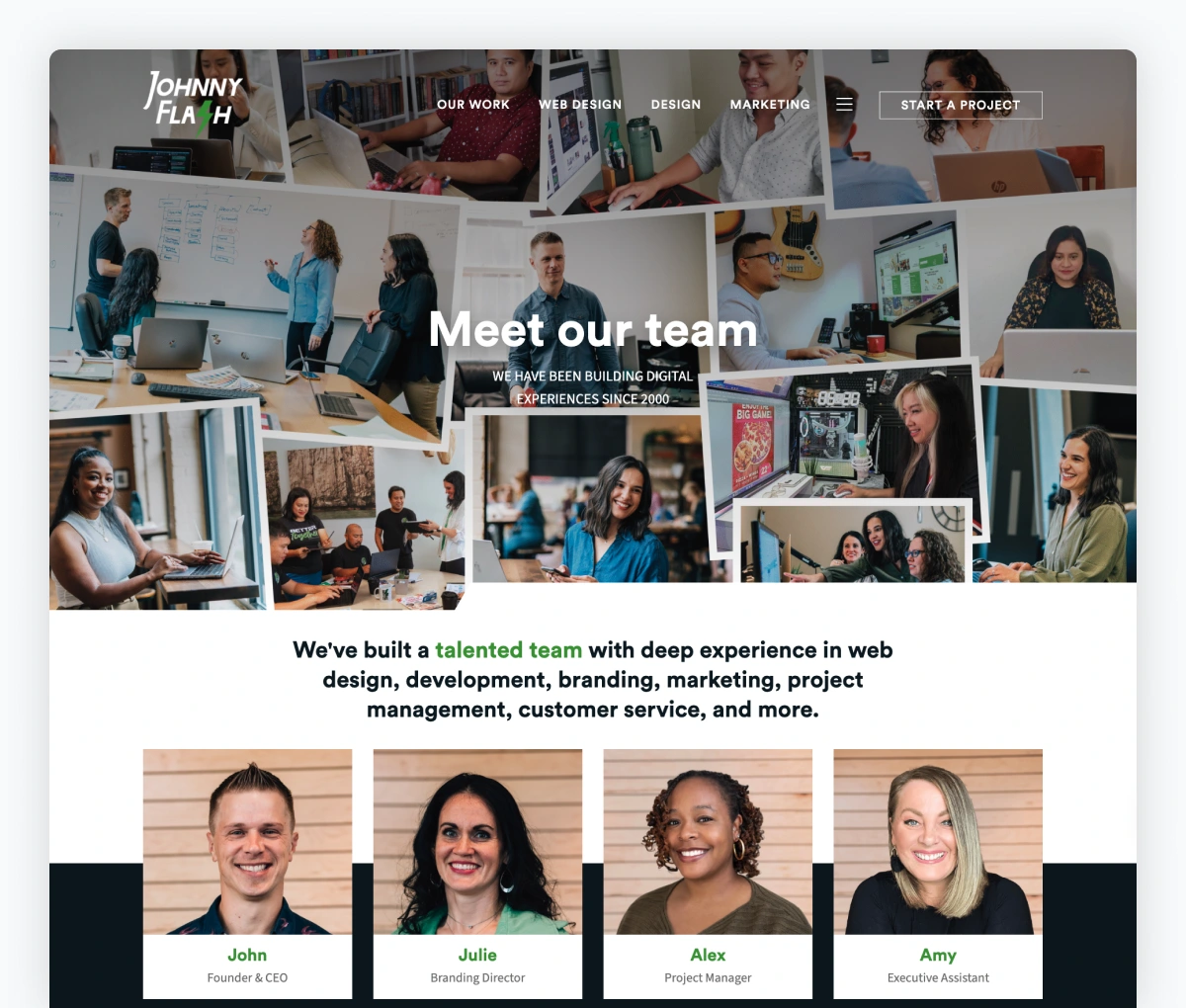
Prospects read your About page to decide if they like you. They don't care when your company was founded. They care about whether you're the right partner.
Most About pages read like a LinkedIn bio or a founder's resume. Here's what the About page should actually cover:
- Who you help and why you help them
- The humans behind the logo (real photos of your team, not stock)
- What you believe about the work (your point of view, your approach)
- Proof you're legit (years in business, clients served, recognizable logos)
- Credentials that matter in your niche (certifications, partnerships, awards, published work)
A photo of your team always outshines a stock image. Real wins over polished every time. If you can't get original photos for every spot, use genuine, non-stock images wherever you can.
A short founder video on the About page is one of the highest-trust additions you can make. Sixty seconds of you talking about why you started the agency and who you help builds a connection that no copy can match. Self-recorded on your phone is fine. Authenticity matters more than production quality.
Aim for 600 to 1,200 words. Less and it feels thin. More and prospects skim past the parts that matter most.
The fix: Read your About page out loud. If it sounds like a LinkedIn bio, rewrite it. Add team photos. Add a 60-second founder video. Add the credentials that prospects in your niche actually respect.
Page 3: The Process Page (What It's Like To Work With You)
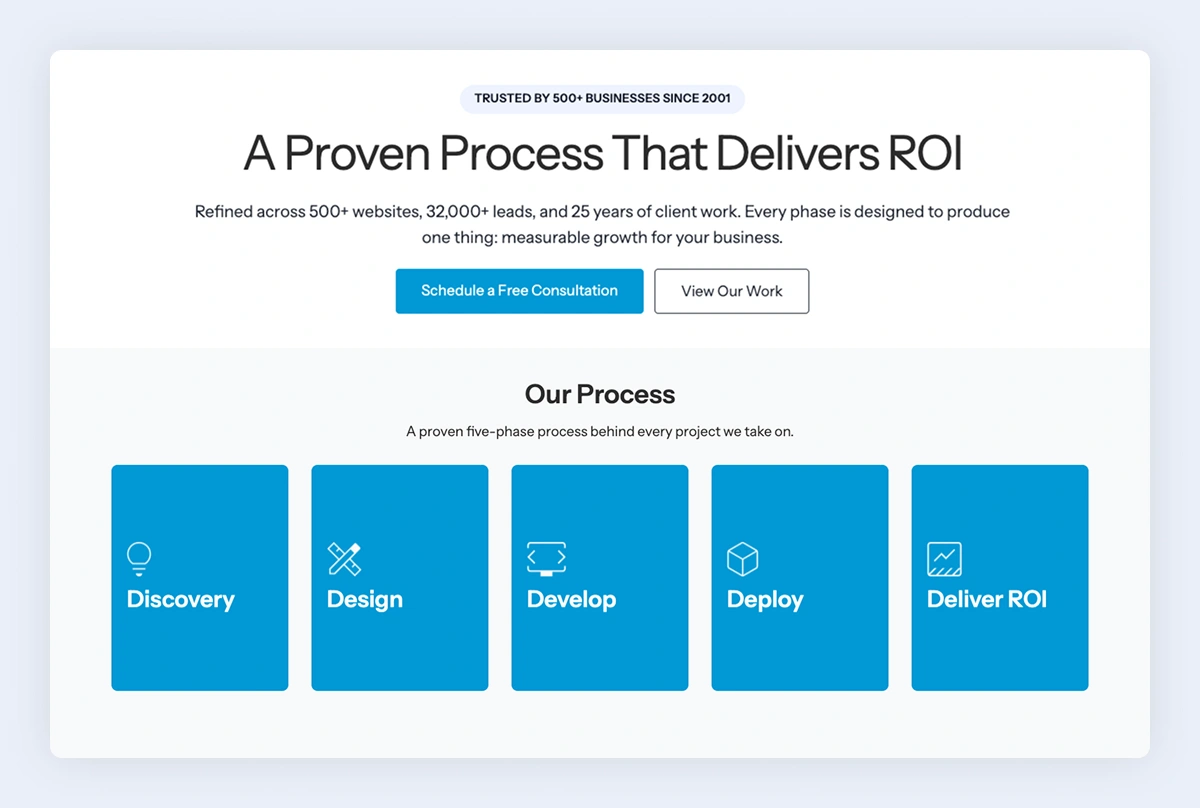
This is the biggest gap I see. Most agencies skip this page entirely, or bury three sentences about "our process" on the About page.
Here's why that's a problem. Prospects fear the unknown. They've been burned before by an agency that disappeared for three weeks, missed a deadline, or billed for work they didn't understand. They want to know what it's like to work with you before they sign.
Walk them through the engagement step by step. Discovery. Strategy. Build or execution. Launch. Ongoing support. For each stage, tell them three things: how long it takes, what you'll deliver, and what you need from them.
That last one matters more than agencies realize. Prospects want to know what they're signing up for. Will there be weekly calls? A Slack channel? A client portal? Do they need to provide copy and assets, or do you handle everything? What happens if they miss a deadline on their end?
When you spell out the shared accountability up front, the right clients lean in, and the wrong ones disqualify themselves. Both outcomes save you time.
In fact, agency clients have told me that one reason they chose to work with us was that we communicated our process on the site. Then they saw it in action across every stage: intake, consultation, discovery. That gave them the confidence to trust the rest of the engagement. Communicating your process is half of it. You also need to follow it.
Now do something most agencies never do: name your methodology. "Our 4-Phase Growth System." "The Conversion-First Build." "The Local SEO Stack." A named process feels like real intellectual property. A generic project plan feels forgettable. Prospects remember named methodologies. Competitors can't copy them. And you can charge more for them.
Add a simple visual: a horizontal timeline, a numbered diagram, or even a short explainer video walking through your process. Most prospects scan. A visual gives them something to anchor to.
The fix: If you don't have a Process page, build one this week. Include timelines, deliverables, and the client's responsibilities at each stage. Name your methodology. Add a visual or video.
Page 4: Service Pages (Outcomes, Not Deliverables)
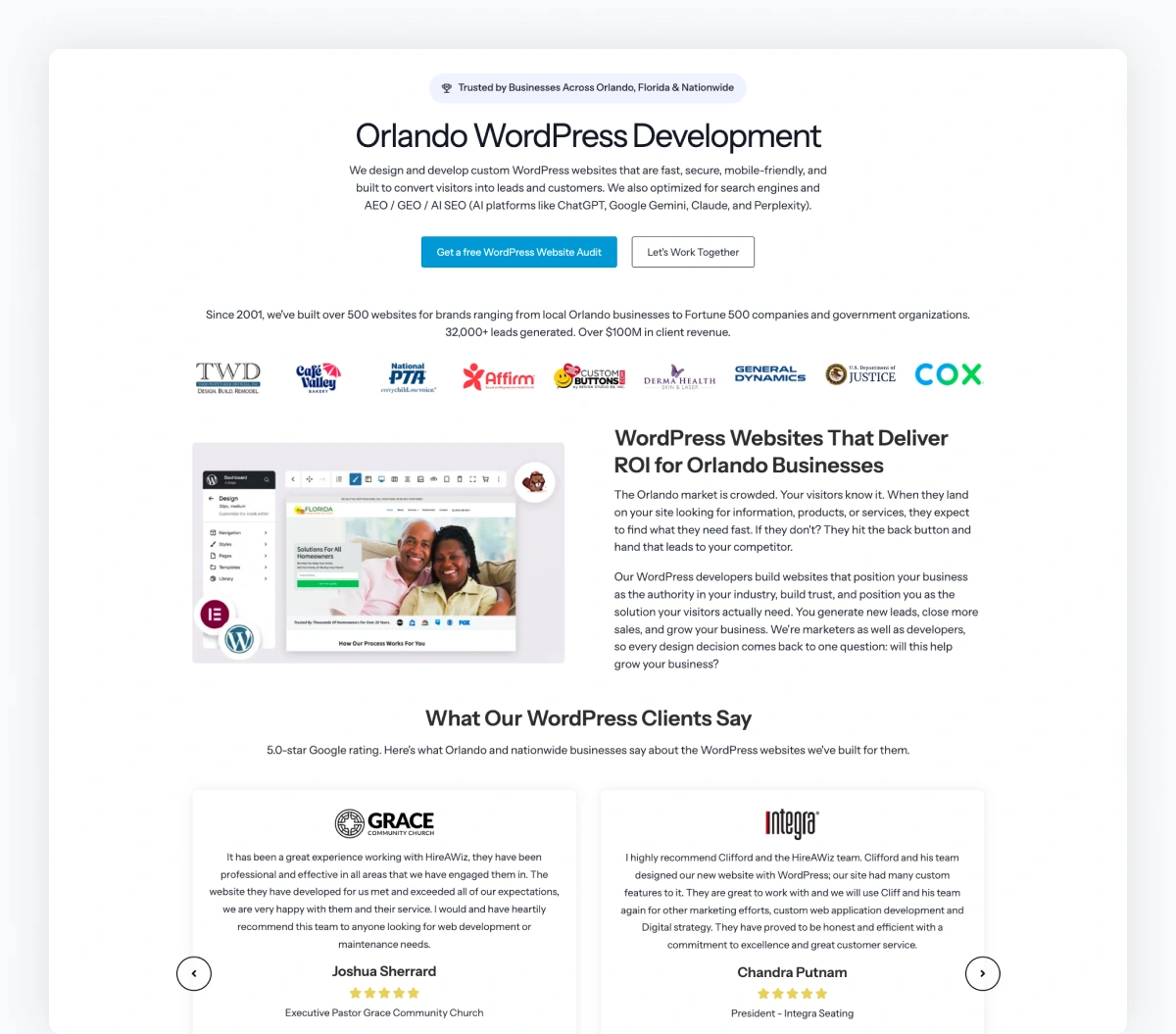
Nobody wants a "WordPress build." They want more leads. Better-fit clients. A site they're proud to send prospects to. Less stress every time they look at their website.
Every service page needs five things:
- The problem you solve (in their words, not yours)
- The outcome they'll get (specific, measurable when possible)
- Your specific approach (why your way works)
- Proof (a case study, a result, a testimonial)
- A clear primary call to action (book a call, get a quote, start a project)
Add a short "who this is right for" section. Business size. Industry. Stage. When prospects self-identify, they convert at much higher rates and show up to the call already pre-qualified.
About pricing: include a starting price or a range when you can. Hidden pricing is one of the top reasons qualified prospects bounce. You don't have to publish a full menu. A simple "investments start at $5,000" line filters tire-kickers before they hit your calendar.
Capture Prospects Who Aren't Ready To Buy Yet
Most agencies stop at the primary CTA. A booked call only works for prospects who are ready to buy. Everyone else bounces.
You also need a secondary CTA for the visitors who aren't ready yet. This is where a lead widget earns its keep. Drop an embeddable audit widget on your service pages so undecided visitors can get personalized insights on your site in exchange for their email. Now you're capturing leads you would have otherwise lost, and each one comes with an audit report that fuels your follow-up conversation.
Pro Tip: Increase your website visitor-to-lead conversion rate by integrating a custom lead widget that directly relates to the service offered on each page. For instance, on your web design page, include a lead widget specifically for web design audits. For your SEO services, provide an SEO audit lead widget.
Pay attention to the form itself. Three to five fields convert dramatically better than ten. Ask for what you actually need to qualify the lead, not everything you'd love to know. Multi-step forms (a few short questions across two or three steps) often outperform single long forms.
Include three or four service-specific FAQs at the bottom of each service page. Pricing range, timeline, what's included, what's not. This handles objections in line and doubles as AI-friendly content that gets cited when prospects ask AI platforms about that specific service.
Finally, link this service page to related content: case studies in the same vertical, blog posts on the same topic, your process page, and any complementary services. Internal linking is the connective tissue of a site that markets and sells. AI platforms read these links to map how your topics connect.
The fix: Pick your highest-revenue service page and rewrite the opening from the prospect's perspective. Add pricing transparency. Tighten your form. Add a secondary CTA with a lead widget. Add service-specific FAQs. Link to related content.
Page 5: Case Studies And Results (Proof They're Not The First)
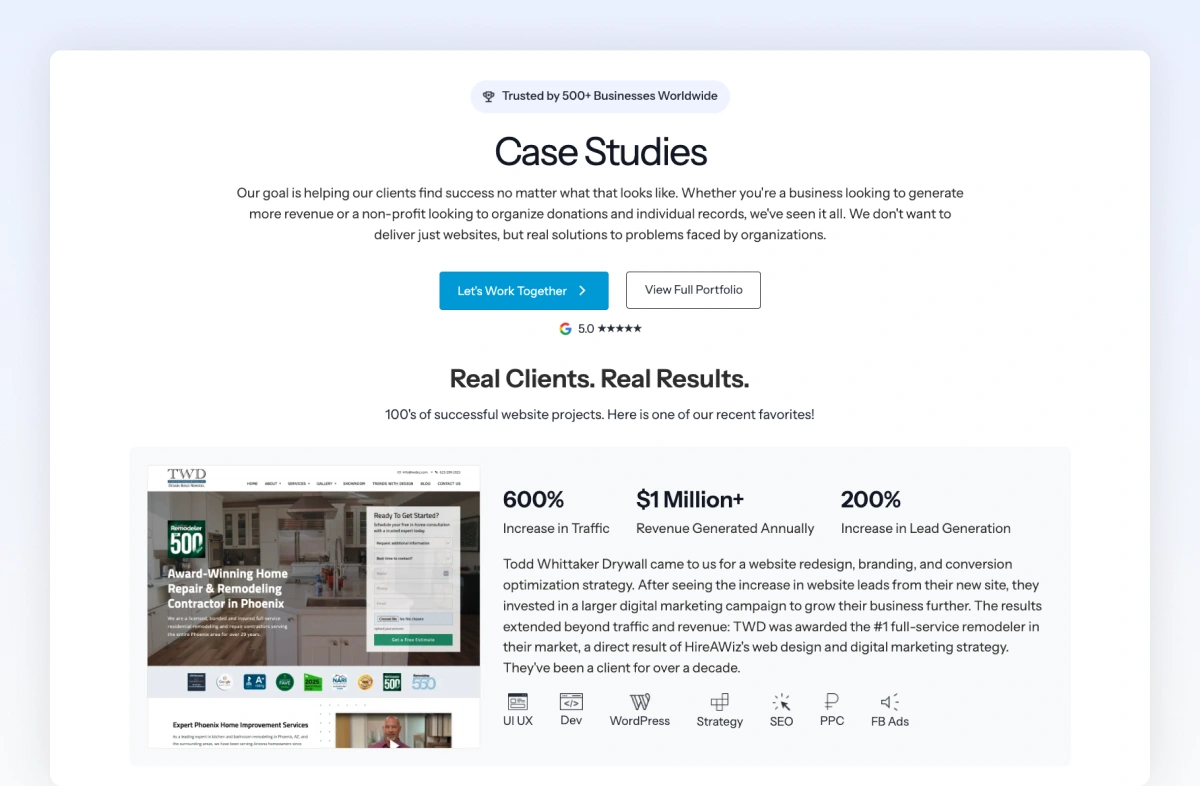
Three great case studies beat thirty vague ones. Here's what great looks like:
- Specific before and after numbers
- An industry or business model that matches your ideal client
- A real quote with a full name, company name, and ideally a photo or logo
- A clear structure: problem, approach, outcome
- Visual proof (screenshots, metrics, the actual result)
Tag each case study by service and industry, and link back to the relevant service page from within the case study. When a prospect lands on your SEO case study, they should see a clear path to your SEO service page. This turns proof into a path to conversion instead of a dead end.
A 60 to 90-second video testimonial outperforms any written quote. If you can get even one client on camera answering "what was the problem, what did we do, and what's different now?" that one video will close more deals than a year of social posts. Most clients will say yes if you ask. Most agencies never ask.
The biggest mistake I see is the "we did it all" case study. Vague outcomes, no numbers, no specifics. Those don't build trust. They read like filler.
The fix: Select your top three client success stories and write them as 300-word narratives with specific metrics. Aim to feature at least one case study in video format. Each story should be linked from all relevant service pages, and each case study should connect back to the specific service provided.
Page 6: The Blog (Thought Leadership And The Marketing Engine)
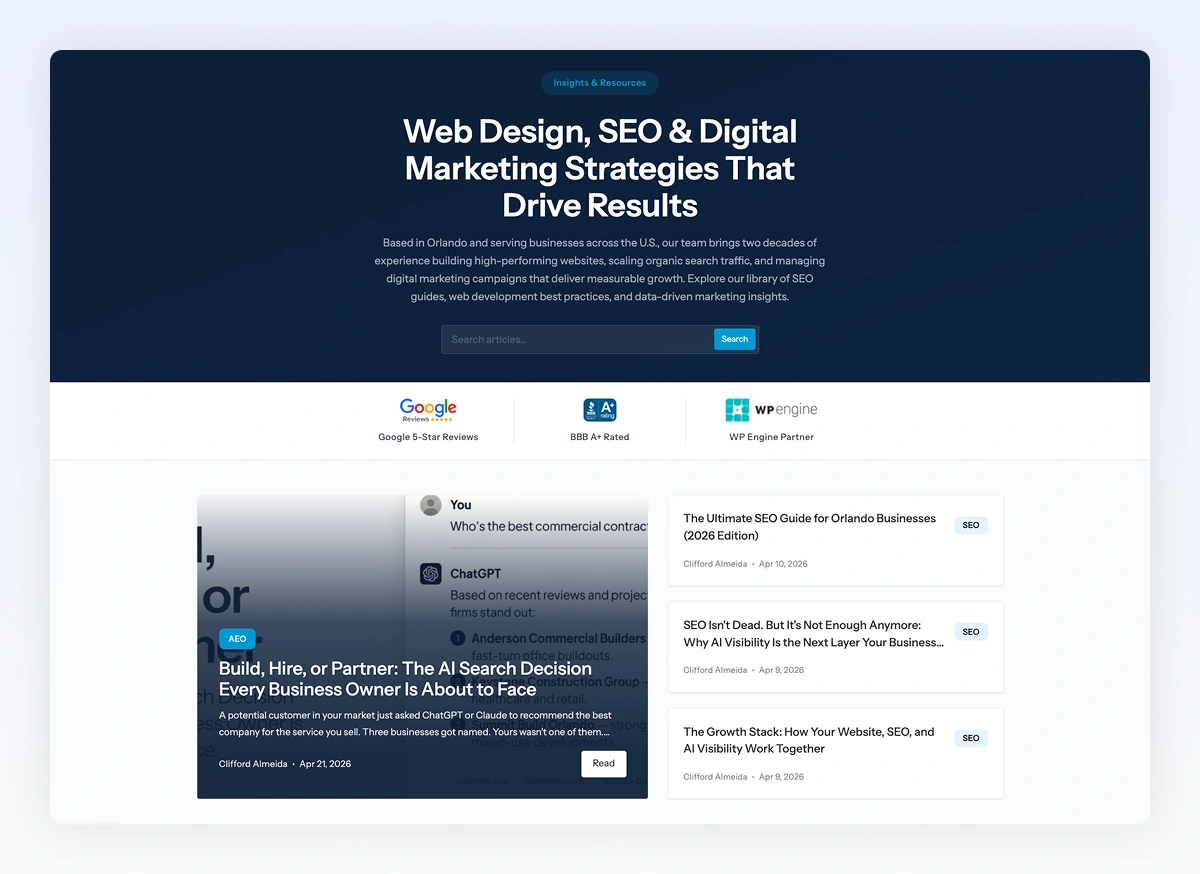
Here's where most agencies leave the most money on the table. They either don't blog at all or they post sporadic updates that read like company news.
That's not what a blog is for. A well-maintained blog is how you:
- Demonstrate expertise on the topics your prospects actually search for
- Connect the dots between your different services (a post on local SEO can link to your GBP service, your content service, and your audit service)
- Document your process and point of view (the "how we think about X" content)
- Answer the deeper questions an FAQ can't (the "why this matters" content)
Build Clusters, Not One-Off Posts
Think in clusters. One-off posts won't build topical authority. Pick three or four pillar topics that matter to your niche, then write supporting posts around each pillar and interlink them. That structure builds topical authority in Google (including AI Overviews) and in AI search. When someone asks ChatGPT, Claude, Perplexity, or Gemini "how often should I redesign my website" or "what makes a good service page," a well-linked cluster is the content those platforms pull and cite.
This matters more than ever. ChatGPT alone now serves 800 million weekly active users (OpenAI, October 2025), and roughly 25% of Google searches now trigger AI Overviews (Conductor 2026 AEO/GEO Benchmarks).
86% of top-mentioned sources are NOT shared across AI platforms (Ahrefs, 2025). And 80% of AI citations don't even appear in Google's top 100 search results (Ahrefs, 2025). Traditional SEO rankings don't guarantee AI visibility. You need to show up on each platform independently, and a consistent blog with strong internal linking is one of the best ways to do that.
Want to see exactly where you're showing up across ChatGPT, Claude, Perplexity, and Gemini (and where competitors are winning)? Here's how to run an AI Visibility Audit on your own site and your top three prospects' sites. The findings drive the next 90 days of content priorities.
Every blog post should include an author byline with credentials. This is a direct E-E-A-T signal to Google and a trust signal to readers. Anonymous corporate blog posts don't build authority. A real expert with a real bio does.
And like your service pages, your blog posts need a secondary CTA for readers who aren't ready to book. Embed a lead widget offering a relevant audit or assessment tied to the topic, or offer a downloadable agency lead magnet like a checklist or playbook in exchange for an email. Blog traffic is usually top of funnel. Without a way to capture those visitors, you're spending effort to rank content that delivers nothing but pageviews. We've covered this angle in more depth in our guide on how to generate leads from your agency website.
Repurpose And Refresh (The Two Tactics Agencies Skip)
Repurpose every post. One blog post turns into 5-10 social posts, an email newsletter, a video script, a podcast episode, and a sales asset. If you're publishing once and walking away, you're leaving 80% of the value on the table.
Refresh old content. Updating a 2-year-old post that's already ranking often delivers better ROI than writing a brand new one. Add new sections, update stats, refresh examples, and republish. Google rewards freshness, AI platforms favor recent content, and your existing readers benefit.
One published blog post can work for you for years. Stop treating it like a chore.
The fix: Pick three pillar topics that matter to your niche. Publish one post on each in the next 60 days. Add author bylines. Interlink them. Link them to your service pages. Add a lead widget CTA. Then schedule monthly refreshes of your top-performing older posts.
Page 7: FAQs (Context-Specific First, Centralized If Needed)
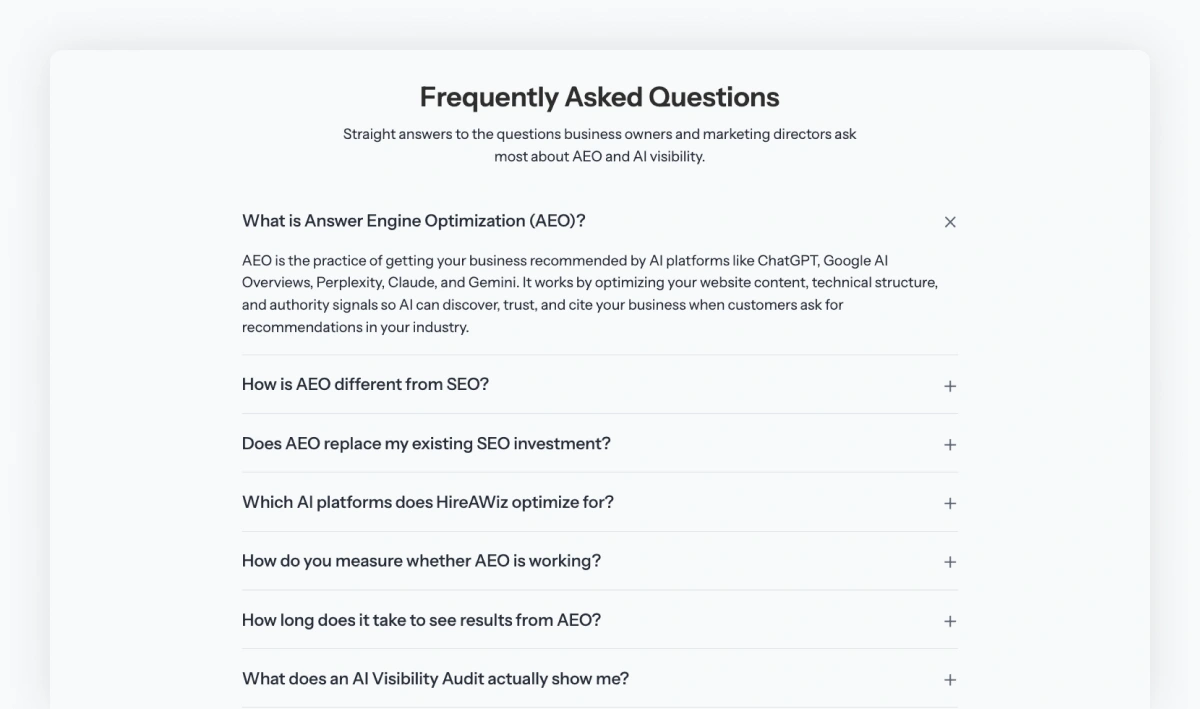
Every objection you handle on a sales call should already be answered on your site. Pricing ranges. Timelines. What's included. What you don't do. How you handle revisions. What happens if something goes wrong?
When prospects find those answers before the call, two things happen. Unqualified leads self-select out. Qualified leads show up warmer and ready to talk specifics.
Here's the best practice most agencies miss. FAQs work best when they're embedded inside the pages where the visitor's question naturally comes up. Pricing questions belong on the service page the prospect is reading. Timeline questions belong on the Process page or the relevant service page. Technical questions belong on the related blog post. A visitor on your SEO service page shouldn't have to navigate to a separate FAQ page to find out what an SEO engagement costs or how long it takes.
That's why you saw FAQs called out earlier in the Services section. The same logic applies to blog posts: a deep guide on local SEO should have a few related FAQs at the bottom that handle the natural follow-up questions a reader on that topic would have.
When A Centralized FAQ Page Makes Sense
If you're not embedding FAQs across your pages yet (most agencies aren't), a single centralized FAQ page is a solid starting point. Better than no FAQ content anywhere. Organize it by category instead of dumping 30 questions in one long list. Pricing and investment. Process and timeline. Scope and deliverables. Post-launch and support. Categorized FAQs are easier for prospects to scan and cleaner for AI platforms to parse.
The ideal long-term setup is both: context-specific FAQs on the pages where buying decisions actually happen, plus a centralized FAQ page for visitors who want everything in one place.
FAQ Writing And Schema Rules Apply Everywhere
Wherever the FAQs live, the rules are the same. Keep each answer between 50 and 150 words. Long enough to be useful, short enough that AI platforms can extract a clean response. This is the sweet spot for AI citation.
Add FAQ schema markup to every page that has an FAQ section, whether that's a service page, a blog post, or a centralized FAQ page. Schema helps you earn rich snippets in Google search results and sends a clear signal to AI platforms about how your content is structured. While you're at it, add Organization schema, Service schema for each major service, and Article schema for blog posts. Add LocalBusiness schema if you serve a specific market. Schema is one of the highest-ROI technical lifts an agency can make.
Inside each FAQ answer, link to the relevant service page, case study, or blog post when it makes sense. On a blog post, a question like "how long does a website redesign take?" should link to your web design service page. Linked FAQ answers do double duty. They handle the objection and pull the visitor deeper into your conversion path.
The fix: Write down the 5-10 questions you answer on every sales call. Map each one to the page where it should live: pricing questions on service pages, process questions on the Process page, technical questions on related blog posts. Add a centralized FAQ page as a backup. Add FAQ schema markup to every page that has an FAQ section. Link each answer to a relevant page.
Page 8: The Contact Page (Where Most Agencies Drop The Ball At The Goal Line)
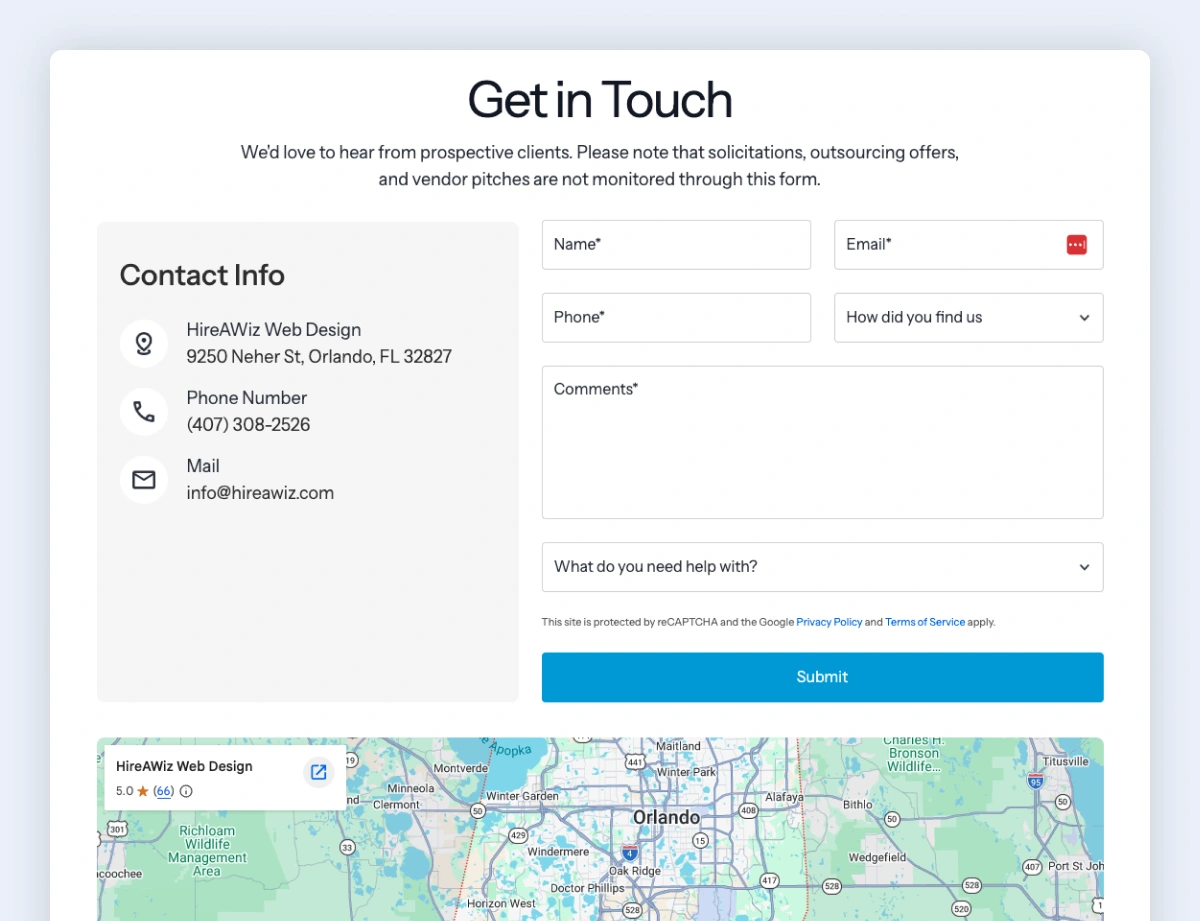
Most agencies have a Contact page. The gap is what's on it.
Walk through 20 agency Contact pages, and you'll see the same thing 18 times: a generic form with five to ten fields, maybe an email address, and nothing else. No phone number. No address. No map. No reviews. No trust signals. Just an empty form on a blank page.
This is the moment a visitor has decided to reach out. They've read your About page, scanned your Services, and maybe watched a case study video. They're motivated. And then you hand them a sterile form with zero reinforcement of why they're about to commit to a conversation.
Here's what an agency Contact page should actually do.
Show Your Contact Info Prominently
A contact form is fine. A contact form with no other way to reach you is a barrier. Display your phone number with tap-to-call enabled on mobile (tel: link). Display your email. Display your physical address if you have one, even if you work remotely most of the time. List your hours and a clear response time expectation: "We respond to inquiries within 24 hours, usually faster."
Different prospects prefer different channels. Some want to fill out a form. Some want to call. Some want to email. Some want to schedule a call directly. The agencies that give prospects options get more inquiries than the ones that force everyone through one channel.
Embed Your Google Business Profile
This is the move almost no agency makes, and it's one of the highest-impact trust additions on the Contact page. Embed your GBP map directly on the page. Visitors immediately see:
- Where you're located (real address, real business)
- Your star rating and review count
- Recent reviews scrolling underneath the map
- Photos of your team or office
- Direct buttons to call, get directions, or visit your website
That single embed delivers more trust signals than a paragraph of copy ever could. It also reinforces your local presence if you serve a specific market.
Make sure your GBP is actually optimized first. A bare-bones GBP with three reviews and no photos hurts more than it helps. If your GBP needs work, that's a separate project worth doing before the embed goes live.
Add Social Proof On The Contact Page Itself
Most agencies dump all their social proof on the home page and forget the Contact page. This is backward. The Contact page is where the visitor needs the most reinforcement, because they're about to take an action that will cost them time and expose them to a sales conversation.
Add at least one of: a testimonial with a real name and company, a row of recognizable client logos, your review count and star rating, or a recent case study tile linking to the full story. Something on the page that says "the last person who filled this form out got real results."
Keep The Form Tight And The Next Step Clear
Three to five fields. Ask for what you need to qualify the lead, not everything you'd love to know. Name, email, phone, what they need help with, and maybe a budget range. That's it.
Then build a real thank-you page. Skip the empty "Thanks, we'll be in touch." Tell them what happens next. When will they hear from you? What to expect on the discovery call. Maybe a piece of relevant content to read while they wait. The thank-you page is a missed conversion asset on most agency sites.
Schema And Tracking
Add ContactPage schema. Add LocalBusiness schema if you serve a defined geographic market. Make sure your form submission fires a conversion event in GA4 (more on this in the Measurement Layer section below). Track form abandonment so you can see if a specific field is causing drop-off.
The fix: Open your Contact page. Is your phone number visible and tap-to-callable? Is your GBP embedded with reviews showing? Is there at least one piece of social proof on the page? Is your form five fields or fewer? Does your thank-you page set expectations and provide a next step? Any "no" answer is a fix for this week.
The Measurement Layer (What Most Agencies Skip)
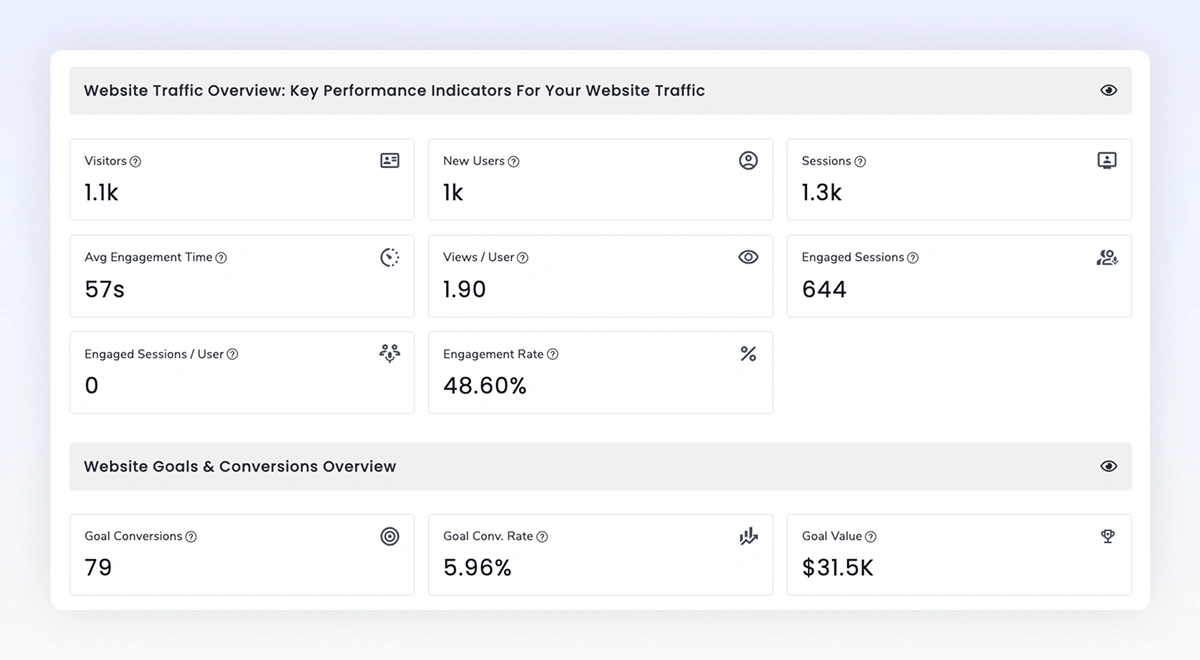
Building the right pages is half the job. The other half is knowing if any of them are actually working.
Many agencies have Google Analytics installed. They can tell you pageviews went up. That's it. Nobody can tell you which page is driving the most booked calls, which traffic source converts best, or whether last month's About page rewrite actually made a difference.
You can't improve what you don't measure. And you can't walk into a client conversation about results if you can't measure your own.
The Conversion Events Worth Tracking
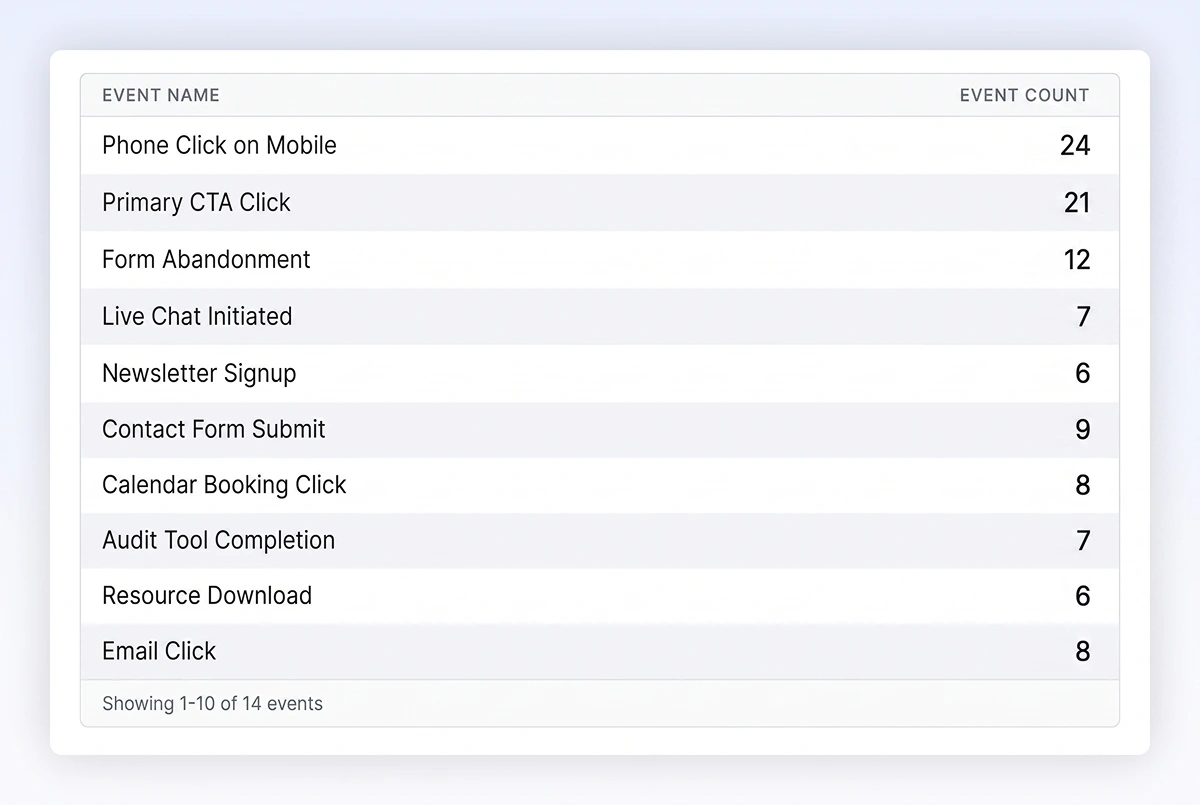
At minimum, every agency site (and every client site you build) should be tracking these as conversion events:
- Phone number clicks on mobile (tel: links). Huge for local service businesses and still massively under-tracked.
- Email address clicks (mailto: links). Same idea, different channel.
- Contact form submissions. Not pageviews of the contact page. Actual submissions.
- Form abandonment. The visitors who started filling out a form and stopped. This is where you find friction.
- Lead widget or audit tool completions. Every completed audit is a pre-qualified lead.
- Live chat initiations. Someone starting a chat is actively interested. Add an AI-powered chatbot for after-hours capture so no message goes unanswered.
- Calendar booking clicks (Calendly, SavvyCal, HubSpot, whatever you use). Usually the real bottom-of-funnel action.
- Primary CTA button clicks (Book a Call, Get a Quote, Start a Project). Even without completion, you see intent.
- Newsletter signups. Smaller commitment, still a real marketing asset that builds your owned audience.
- Key resource downloads. PDFs, guides, lead magnets.
Tools, Tagging, And The Monthly Review
Use Google Tag Manager (GTM) to set these up cleanly without having to touch your site code every time. GTM is free, well-documented, and the standard tool for handling event tracking across GA4 and most other analytics platforms.
Set each event up as a Key Event in GA4, or as a conversion in Matomo or Plausible if you prefer a privacy-friendly alternative. Then build a simple dashboard that shows you, at a glance, which pages and traffic sources are driving each one.
Tag every campaign with UTM parameters. Most agencies don't, which means they can't tell paid social from organic from email in their analytics. Without UTMs, attribution is guesswork. Every link in every campaign, email, and social post should carry source, medium, and campaign tags so you know exactly where your conversions came from.
Go one layer deeper with a heatmap tool. Microsoft Clarity is free and gives you click maps, scroll maps, and session recordings. Hotjar is another established option. Watching real visitors interact with your site will teach you more in a week than a year of looking at bounce rates. You'll see where people hesitate, what they click that isn't a link, and where they drop off.
The Monthly Review That Drives Improvement
Build a monthly review ritual. Thirty minutes, the first week of every month. Which pages drove conversions? Which didn't? What changed? Most agencies never do this, which is why they never improve.
Here's the payoff. When you can say "40% of our booked calls last quarter came from the Process page," you make different decisions than when you're guessing. You rewrite that page first. You build more pages like it. You send more traffic to it.
The same conversation applies to every client. If they don't know which page on their site drives the most leads, neither of you can make an informed decision about what to fix first. That's exactly the gap My Web Audit was built to surface. The platform's website audit template maps performance, conversion, content, and AI visibility issues into one client-ready report. Use it during discovery or for ongoing monthly reviews. Measurement is the foundation that makes every other recommendation credible.
A Real Example: Practicing What We Preach
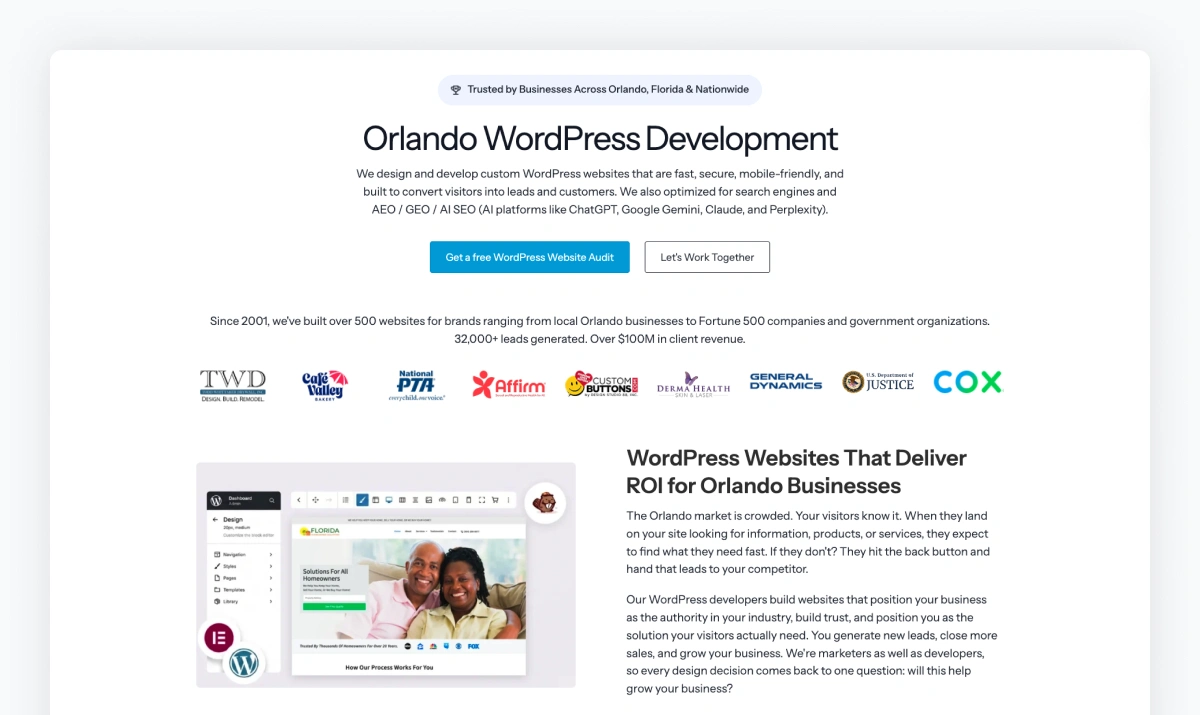
Want to see this framework applied to a real agency? Here's mine.
Our agency HIREAWIZ recently rebranded in April of 2026, following our move to Orlando. The rebrand became the perfect forcing function to rebuild our website using the exact framework you just read.
We rewrote our homepage to focus on the two services that drive most of our revenue, instead of every service we technically offer. We rebuilt the About page around our team and our point of view, not corporate history. We documented our process, gave it a name (the Growth Stack), and built a Process page detailing how we work and why. We rewrote our service pages to lead with outcomes. We restarted the blog with a clear strategy and author bylines. The old blog posts weren't driving much traffic, so we archived them and 301 redirected them. We built a categorized FAQ with schema markup. And we set up conversion tracking for every action that actually mattered.
The results are already showing up. We're starting to rank on page 1 of Google for our target queries. We're getting cited across ChatGPT, Claude, Perplexity, and Gemini for queries that bring us qualified leads. And the discovery calls we're now having feel different. Prospects show up already convinced we know what we're doing, because the website did the work before the call ever started.
None of the strategies or best practices recommended here are out of reach for your agency. We made the time to build the pages that market and sell instead of commissioning another redesign.
The 10-Point Agency Website Check
Before you close this tab, open your site on your phone and run through these ten questions. It takes about 60 seconds:
- Is my site fast on mobile (PageSpeed score 80+, LCP under 2.5s)?
- Does my homepage pass the 5-second test and focus on my top revenue services?
- Does my About page include a team photo, a point of view, real credentials, and, ideally, a founder video?
- Do I have a named Process methodology with timelines, deliverables, and client responsibilities?
- Do my Service pages lead with outcomes, show pricing transparency, include a secondary lead-widget CTA, and include service-specific FAQs?
- Do I have at least three specific case studies with real numbers, tagged to services and industries, with at least one on video?
- Have I published a blog in the last 90 days, with author byline and lead widget CTA, and am I refreshing older posts?
- Do I have FAQs on my service pages and key blog posts (or at minimum a categorized centralized FAQ page), with answers between 50-150 words, FAQ schema markup, and Organization/Service/LocalBusiness schema across my site?
- Am I tracking conversion events with proper UTM tagging via GTM, and reviewing the data monthly?
- Does my Contact page show visible contact info, embed my Google Business Profile with reviews, include social proof, use a 5-field-or-fewer form, and have a real thank-you page that sets expectations?
Count your yeses. If you got fewer than eight, you've got work to do.
Want A Deeper Diagnostic?
The 10-Point Check above gives you a directional read. For a full diagnosis, run the 27-point Agency Website Audit Checklist. It scores your site across nine categories, breaks down where you're strong versus where the gaps are, and delivers personalized recommendations for every weak area. Free, takes about five minutes, and works as a discovery-call tool you can use with prospects, too.
Frequently Asked Questions
What are agency website best practices?
Agency website best practices cover three areas: structure, foundation, and measurement. Structure means eight core pages, each handling specific marketing and sales work. Those pages: home, about, process, services, case studies, blog, FAQ, and contact. Foundation means fast mobile performance and Core Web Vitals that pass Google's thresholds. Measurement means tracking conversion events like phone clicks, form submissions, and audit completions in GA4 or a privacy-friendly alternative. Together, these turn the agency website into a 24/7 lead generator instead of a digital business card.
Which pages does an agency website need?
Every agency website needs eight core pages. The home page passes a 5-second test (who, what, next). The about page builds trust with team photos and credentials. The process page shows what working with you looks like. Service pages lead with outcomes. Case studies share specific before/after numbers. The blog publishes pillar content monthly. The FAQ handles common objections. The contact page reinforces trust with visible contact info, an embedded Google Business Profile, and social proof. Each page does specific work in attracting prospects, handling objections, or closing deals.
How fast should an agency website load?
An agency website should load in under 2.5 seconds on mobile. That's measured by Largest Contentful Paint. Cumulative Layout Shift should be under 0.1. These are Google's Core Web Vitals thresholds. Sites that meet them see users 24% less likely to abandon page loads. Sites that take longer than 3 seconds lose 53% of mobile visitors before the page finishes loading. Run your site through Google's free PageSpeed Insights tool to check where you stand and what to fix first.
Should I include pricing on my agency website?
Yes, include at least a starting price or a range when you can. Hidden pricing is one of the top reasons qualified prospects bounce from agency websites. You don't have to publish a full menu. A simple "investments start at $5,000" line filters tire-kickers before they hit your calendar. It also pre-qualifies the leads who book a call. Pricing transparency on service pages also reduces objection-handling time during discovery.
How often should I publish blog content as an agency?
Aim for at least one new blog post per week. If that's not realistic, target two or more per month. Organize them into pillar topic clusters that interlink with your service pages. Consistency matters more than volume. One well-researched, expert-bylined post per month outperforms four shallow posts. Just as important: schedule monthly refreshes of your top-performing older posts. Updating a 2-year-old post that's already ranking, with new sections, current stats, and refreshed examples, often delivers better ROI than writing a new piece from scratch.
What conversion events should I track on my agency website?
Track every action that signals lead intent: phone number clicks on mobile (tel: links), email clicks (mailto: links), contact form submissions, form abandonment, lead widget completions, live chat initiations, calendar booking clicks, primary CTA button clicks, newsletter signups, and resource downloads. Set these up as Key Events in GA4 (or conversions in Matomo or Plausible) using Google Tag Manager. Tag every campaign with UTM parameters so you can attribute conversions to specific traffic sources.
Do I need a Process page on my agency website?
Yes. A Process page is one of the highest-impact pages on an agency website, and it's the page most agencies skip entirely. Prospects fear the unknown. A documented process walks them through what working with you looks like at each stage, including timelines, deliverables, and what you'll need from them. Naming your methodology (think "The Growth Stack" or "The Conversion-First Build") signals proprietary IP rather than a generic project plan. Add a visual timeline or short explainer video for the scanners. Most agencies bury three sentences about process on the About page and call it done. That's a missed conversion opportunity.
Should agency websites have a blog?
Yes. A consistent blog is how agencies demonstrate expertise, build topical authority, and earn citations in both Google search and AI platforms like ChatGPT, Claude, Perplexity, and Gemini. Strategy matters more than volume. Pillar topic clusters with internal linking outperform sporadic company news. One well-researched, expert-bylined post per month is better than four shallow posts. Every post needs an author byline (for E-E-A-T), a secondary lead-capture CTA, and internal links to your service pages. Refreshing older posts with new sections, current stats, and updated examples often delivers better ROI than writing brand-new content.
What schema markup does an agency website need?
At minimum, an agency website needs five schema types: Organization (site-wide identity, including social profiles), Article (every blog post, with author and date), FAQPage (FAQ sections, both site-level and service-specific), Service (each major service offering with description and area served), and BreadcrumbList (navigation hierarchy). Add LocalBusiness schema if you serve a specific geographic market. Schema helps Google understand your site structure, earns rich snippets in search results, and sends clear signals to AI platforms about what your business does and where it operates. It's one of the highest-ROI technical lifts an agency can make.
Apply Agency Website Best Practices In Your Sales Process
Use this as a strategic lens with every prospect you talk to. Apply it during discovery, not as a separate paid offer.
Before a discovery call, run through the framework on their site. Note the gaps. Where's their About weak? Is there a Process page at all? Are their Service pages leading with deliverables? Are they capturing leads who aren't ready to buy yet? When was the last blog post? Is the site fast on mobile? Then open up their analytics situation: do they have conversion events set up? Can they tell you which page drives the most leads?
Walk into the call with specifics. Skip the "your website could use some work" opener. Try this instead: "Your About page is missing a team photo and a point of view, your service pages don't connect to outcomes, your last blog was 14 months ago, your site takes 6 seconds to load on mobile, and you're not tracking phone clicks. Here's what that's costing you in leads and closed deals."
That's a completely different conversation than a typical sales pitch. You're showing them what's broken and why it matters. The dynamic shifts. You become the strategic advisor your prospects actually want to hire.
The scope naturally expands because you've uncovered the real problem. One audit observation during discovery can justify thousands in additional project scope. You didn't upsell. You identified what they actually needed. This is one of the most underused approaches to closing more agency sales.
Use the framework on your own site first, obviously. But the real power is using it with every prospect before the word "proposal" ever comes up.
Your Next Move
Open your About page right now. On your phone is fine. If it's less than 400 words and doesn't mention a single client outcome, that's where you start this week.
Write the About page you'd want to read if you were the prospect. Then move to your Process page. Then Services. Then get a blog out. And while you're on the site, run a PageSpeed test on your homepage and make sure your analytics is actually tracking what matters.
Agency website best practices are a working framework you apply to your own site and then use to guide every client engagement afterward. Your website is either marketing and selling for you 24/7, or it's sitting there looking pretty. Which one do you want?
Want a structured way to apply this framework? Start a free 7-day trial of My Web Audit. Run audits on your own site and your clients' sites, then use the findings during discovery calls. The platform packages everything we covered — page speed, on-page SEO, AI visibility, conversion gaps — into client-ready reports you can use to win the work and prove it after.

About Clifford Almeida
You may also like
AEO Prompt Strategy for Agencies: How to Find, Choose, and Track the Right AI Prompts
Right now, your client’s best prospects are asking AI to recomme...
Learn more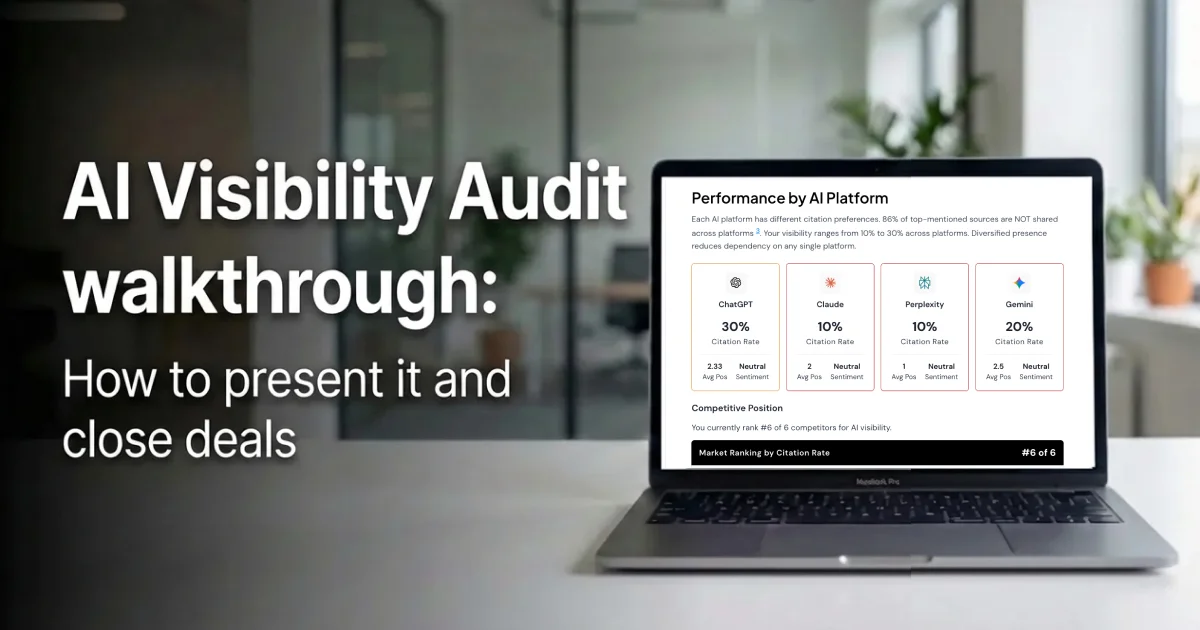
AI Visibility Audit walkthrough
How to present it and close deals There's a lot of noise around AI sea...
Learn more